It is not uncommon to see a blank space on a web page for a brief second before the image that belongs there loads in. While this is great for performance, it's not great for presentation. Thankfully you can selectively preload images in the <head> of your document. Unfortunately this can be difficult to achieve when using CSR (client-side rendering) with React SPAs (single page applications).
While there are many solutions to this problem, in this article I will be going over how to successfully preload images using the capabilities of TanStack Router, which is my preferred router library for my React applications.
Prerequisites🔗
-
A React application using:
- Client Side Rendering - There are better solutions for this if you are using SSR
- React v19 - We will be using functionality introduced in this version that will not exist in prior versions.
- TanStack Router - The methods used in this guide are present only in TanStack Router, though similar functionality may be present in other router libraries.
Preloading with TanStack Router🔗
The secret to successfully preloading images (or other resources) is using TanStack Router's beforeLoad method on a route. With this method, we can call React 19's preload method (detailed here), which will add a preload link to the document's head. Here's what that code looks like for preloading an image inside a route file:
import { createFileRoute } from "@tanstack/react-router";
import { preload } from "react-dom";
import HomePage from "../pages/home-page";

export const Route = createFileRoute("/")({
  component: HomePage,
  beforeLoad: () => {
    preload("/images/profile.webp", {
      as: "image",
    });
  },
});
Loading this route with no cache, we can see what is happening in the network tab of the browser dev tools:
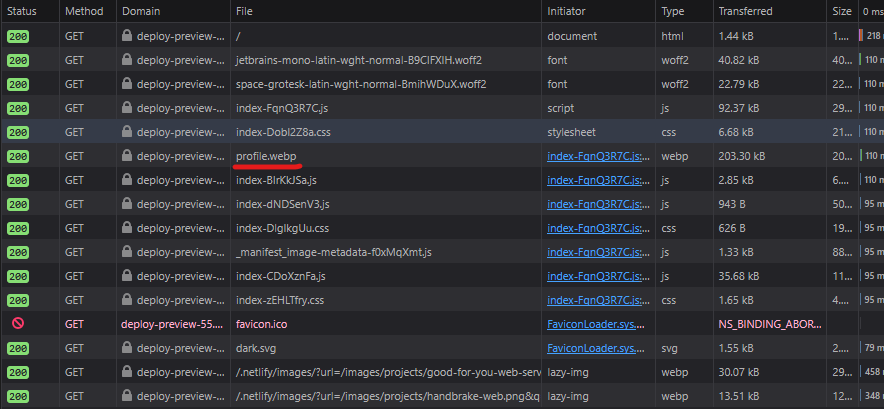
While the bundle's randomly generated module file names aren't helpful here, you can see that the image file we added a preload for is loading quite early in the chain of requests (prior to the module that the router is loading for this route), as well as prior to other image files that are not preloaded.
The tangible result of this is that the moment your component loads, the image is already displayed since it was already fetched from your preload. No more image popping!
Conclusion🔗
The example shown above is about as basic as it gets - because this is being done with JavaScript (or TypeScript in this case) there is so much more you can do with this method. For example, you can dynamically set preloads using the preload method's properties, such as params, context, or location:
import { createFileRoute } from "@tanstack/react-router";
import { preload } from "react-dom";
import BlogPostPage from "~pages/_blog/blog-post-page";

export const Route = createFileRoute("/blog/$post/")({
  component: BlogPostPage,
  beforeLoad: ({ params }) => {
    preload(`/images/blog/how-to-preload-images-in-a-react-19-spa-with-tanstack-router-so-your-images-appear-instantly/thumbnails/${params.post}.png`, {
      as: "image",
    });
  },
});
As you can see, there is a lot you can do with this. Just keep in mind that you don't want (or need) all images to preload or else you risk slowing down the initial load of your route component. Preloading just gives you a bit of control over how your page might look as it is first rendering, but using lazy image loading is still the way to go for the majority of your image assets.